
How to Choose a Smart Water Bottle for Daily Hydration
Table of Contents
- Quick Comparison: What to Look for in a Smart Water Bottle
- How Smart Water Bottles Track Hydration
- Benefits of Smart Water Bottles for Daily Hydration
- Key Features to Evaluate: Battery, Materials, and Design
- How to Sync Your Smart Water Bottle with Fitness Apps
- Smart Water Bottle Cleaning and Maintenance
- Common Mistakes to Avoid When Choosing a Smart Water Bottle
- Conclusion: Picking the Right Smart Water Bottle for You
- Frequently Asked Questions
Last Updated: September 20, 2026
Quick Comparison: What to Look for in a Smart Water Bottle
Choosing a smart water bottle comes down to four decisions: tracking method, battery life, materials, and app compatibility.
| Decision | What to Check | Why It Matters |
|---|---|---|
| Tracking method | Sensor type and accuracy | Determines how much you trust the numbers |
| Battery | Life per charge, charging method | Daily charging kills the habit |
| Materials | Stainless steel, BPA-free parts | Affects taste, safety, durability |
| App fit | Bluetooth, fitness ecosystem support | Data is useless if it's siloed |
How Smart Water Bottles Track Hydration
A smart water bottle measures your daily water intake using built-in sensors, then syncs that data to an app that compares it against your hydration goals. Most models use either accelerometer-based tilt detection, which counts sips as you tip the bottle, or capacitive and flow sensors that measure liquid passing through the opening.
Sensor Technology and Automated Alerts
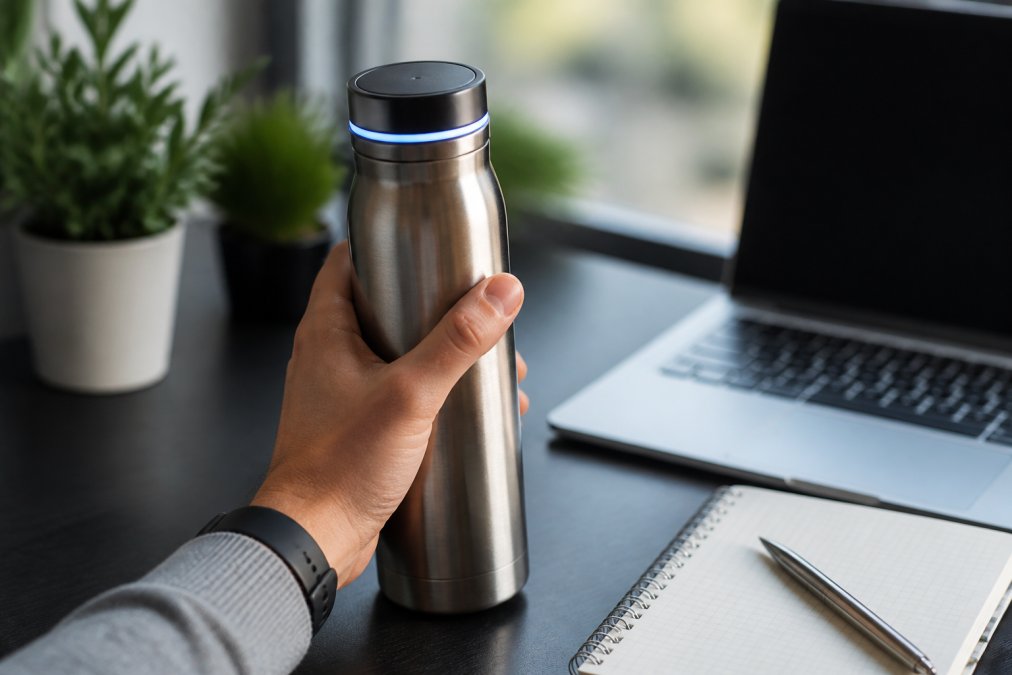
LED Reminders and Customizable Notifications
LED reminders are the most underestimated feature. A glow on the bottle's base or cap reaches you in a way a phone notification doesn't, especially during back-to-back meetings. Look for customizable notifications: quiet hours, adjustable frequency, and different goals for workout days versus desk days.
Benefits of Smart Water Bottles for Daily Hydration
The core benefit of smart water bottles is accountability you don't have to think about. Manual tracking apps require you to log every glass, and most people abandon that within weeks. Automated alerts and data logging remove that step.
Key Features to Evaluate: Battery, Materials, and Design
Battery life and materials are where cheap bottles cut corners, and they're the two specs most likely to determine whether you still use the bottle in six months. A two-day battery and a leakproof stainless steel body beat a feature-packed model that needs nightly charging.
Battery Life and Charging Requirements
Most smart bottles use rechargeable lithium batteries and last several days to a few weeks per charge, depending on how often the sensors and LEDs run. Charging is typically via a magnetic dock or USB-C port. Two practical checks: does the charging method work with your existing cables, and can you use the bottle as a normal bottle while it's dead?
Material Quality, Insulation, and Durability
Stainless steel with vacuum insulation is the standard: it keeps cold drinks cold for hours, resists flavor transfer, and survives drops that crack plastic. Check that every part touching your water, including the lid seal and straw, is BPA-free. Durability comes down to the closure, a leakproof lid with a proper gasket matters more than wall thickness.
How to Sync Your Smart Water Bottle with Fitness Apps
Syncing a smart water bottle with fitness apps takes three steps: enable Bluetooth, pair the bottle through its companion app, then grant permission to share data with your fitness ecosystem. Most bottles connect via Bluetooth Low Energy and push hydration data into platforms like Apple Health, Google Fit, or Garmin Connect. What separates a bottle you keep using from one in a drawer is what happens after pairing: whether the data is accurate, whether it survives a phone upgrade, and whether the app plays nicely with your existing ecosystem.
What "Compatible" Actually Means
"Works with Apple Health" can mean three different things:
- One-way write: the bottle app writes hydration entries into Apple Health, but nothing flows back. Your fitness app sees your water intake; the bottle app never sees your workouts.
- Two-way sync: hydration data flows into the health platform and workout or activity data flows back, so the bottle can adjust your goal on training days. This is the setup most people actually want.
- Export only: the app can produce a CSV or share sheet export, but there is no live integration. Fine for someone who logs manually; frustrating for anyone who wants automatic goal adjustment.
Before buying, check the app store listing and the manufacturer's support page for the specific integration type. A one-way bottle won't lower your goal on a rest day or raise it after a long run, the whole point of pairing it with a fitness ecosystem.
Sensor Accuracy: The Problem Nobody Warns You About
Most smart bottles use one of two sensing approaches, each failing predictably:
- Accelerometer / tilt detection counts a "sip" when the bottle passes a tilt threshold. It overcounts if you set the bottle down mid-drink, carry it in a bag that swings, or knock it over. It undercounts if you drink in small sips that never cross the threshold.
- Capacitive or flow sensors measure liquid moving through the opening. They are more accurate per sip but can drift when mineral scale builds on the sensor surface, and they add cost and a failure point.
- Fill the bottle to a known volume (a marked line or a measuring cup).
- Drink normally for a day without changing your habits.
- Compare the app's total against what you actually poured.
- If the app reads high or low by more than a small margin, run the app's recalibration or reset function and repeat.
Data Portability and Privacy
Hydration data is health data, and where it lives determines what you can do with it later. Two questions before committing to an app:
- Is the data stored locally on the phone, in the cloud, or both? Local-only storage means you lose your history when you switch phones or reinstall the app. Cloud storage means the developer holds your records and you should read the privacy policy to see how long they keep them and whether they share them.
- Can you export or delete your data? A reputable app will let you export your history and delete your account. If neither option exists, treat that as a signal about how the developer views your data.
Firmware and Pairing Troubleshooting
If the bottle won't pair, work through these in order before assuming the hardware is dead:
- Update the companion app first. An out-of-date app is the most common cause of failed pairing after a phone OS update.
- Update the bottle's firmware. Most apps push firmware over Bluetooth; if the app cannot see the bottle, you cannot update the firmware, so fix the app first.
- Forget the device and re-pair. Old pairing records on the phone can block a clean connection.
- Check Bluetooth permissions. Some phone OS versions require the app to have location or nearby-devices permission to scan for Bluetooth accessories.
- Test with a second phone. If the bottle pairs with another phone, the problem is your phone's Bluetooth stack or app install, not the bottle.
A few setup habits that prevent problems later:
- Pair the bottle before your first workout, not during one
- Name the bottle in the app so it is easy to identify among other Bluetooth devices
- Set your hydration goal in the fitness app, not just the bottle app, so the two do not disagree
- Confirm the sync direction in both apps after setup, not just one
Smart Water Bottle Cleaning and Maintenance
Smart water bottle cleaning and maintenance follows one rule: wash everything that touches water, and keep everything electronic dry. Hand-wash the body, lid, and seals with warm soapy water, rinse thoroughly, and air-dry with the lid off. Most manufacturers advise against dishwashers for sensor-equipped bottles because heat and water pressure damage the electronics and seals.
A weekly deep clean prevents the two problems that shorten a bottle's life:
- Odor and biofilm from sugary drinks or protein shakes left too long
- Mineral buildup on sensor contacts that throws off readings
Common Mistakes to Avoid When Choosing a Smart Water Bottle
The biggest mistake is buying for features instead of fit. A bottle with every sensor is worthless if its app doesn't connect to your fitness ecosystem or its capacity is wrong for your day. The costliest mistakes aren't about specs, they're about whether a smart bottle is the right tool for you at all, and what you're agreeing to when you buy one.
Mistake 1: Confusing a Wellness Tracker with a Medical Device
A smart water bottle supports a hydration habit. It does not diagnose dehydration, monitor electrolyte balance, or replace clinical guidance, a distinction some marketing language blurs.
A few practical markers of the difference:
- General wellness use: you want a nudge to drink more during the workday, and the app's goal is a rough target you set yourself. A consumer smart bottle is fine here.
- Clinical hydration needs: you have a condition affecting fluid intake or output, kidney function, heart failure, diabetes management, post-surgical recovery, or a medication with diuretic effects. In these cases, a consumer bottle's sensor accuracy is not adequate for clinical decisions, and the goal should come from a clinician, not an app default.
- Athletic performance use: you are managing fluid and electrolyte replacement around training. A smart bottle can help you track volume, but it will not tell you your sodium or potassium needs, and it should not be treated as a substitute for a sports nutrition plan.
Mistake 2: Ignoring What the App Does With Your Data
Hydration data is health data: it reveals when you drink, how much, and often where. Before you buy, check three things:
- What the app collects. At minimum, expect intake volume and timestamps. Some apps also collect location, device identifiers, and usage patterns.
- Whether it is shared. Read the privacy policy for language about third parties, advertising partners, and analytics providers. "We may share with partners" is a signal to look closer.
- Whether you can export or delete. A reputable app lets you download your history and delete your account. If neither option exists, that tells you how the developer views your data.
Mistake 3: Overlooking the Battery and Electronic Waste Trade-off
Every smart bottle contains a lithium-ion battery and a circuit board, making it harder to recycle than a plain stainless steel bottle and giving it an end-of-life problem a non-electronic bottle doesn't have.
-
A durable bottle you use for years offsets the embedded electronics over its life. The environmental cost is amortized across hundreds of uses.
-
A cheap bottle you replace annually does the opposite. You pay the manufacturing and disposal cost every year, and the battery likely fails before the bottle body does.
-
Is the battery replaceable, or is it sealed into the base? A replaceable battery extends usable life significantly.
-
Does the manufacturer publish a recycling or take-back program? Some do; most do not.
-
Can the bottle still function as a plain bottle when the electronics die? The best designs let you keep drinking after the smart features stop working.
Mistake 4: Buying for Features Instead of Fit
Beyond those, the classic mistakes still apply:
- Ignoring battery life. A bottle that needs nightly charging adds a chore to the habit you are trying to build. Look for multi-day battery life and a charging method that matches the cables you already own.
- Skipping the materials check. Non-BPA-free seals and cheap insulation affect taste and safety, not just durability. Check every part that touches water, including the lid gasket and straw.
- Choosing the wrong capacity. 20 to 24 ounces suits desk work; 32 ounces and up suits gym sessions and long days out. Pick the largest bottle you will actually carry.
- Not testing the closure. A leakproof lid with a proper gasket matters more than wall thickness. If you cannot test it in person, read reviews specifically about leaks after months of use, not out of the box.
Conclusion: Picking the Right Smart Water Bottle for You
Start with the four decisions from the top of this guide: tracking method, battery life, materials, and app compatibility. If a bottle clears those, the remaining choices, capacity and design, come down to how you'll actually use it.
Frequently Asked Questions
Are smart water bottles worth the investment for daily hydration?
They can be worth it if you struggle to drink enough water consistently. A smart water bottle uses sensors to log every sip and sends LED reminders or app alerts when you fall behind. For remote workers or anyone with a busy schedule, that automated nudging removes the guesswork. The upfront cost is higher than a standard bottle, but if it helps you hit your daily water intake, the health payoff often justifies the price.
How do smart water bottles track your water intake?
Most use accelerometers or capacitive sensors in the cap or base to detect tilt and flow each time you drink. That data is sent via Bluetooth to a companion app, which logs the volume and compares it to your hydration goal. Some models also use LED reminders on the bottle itself to prompt you between syncs. Accuracy varies, so look for a bottle with a calibration option and a clear user interface.
Do smart water bottles sync with fitness apps like Apple Health or Fitbit?
Many do, but compatibility varies by brand. Check the product listing or app description for integrations with Apple Health, Google Fit, Fitbit, or Garmin. Syncing usually happens through the bottle's own app, which writes hydration data to your fitness ecosystem. If you already track health metrics in one platform, choose a bottle that explicitly supports it to avoid manual data logging.
How often do smart water bottles need to be charged?
Battery life ranges from about 5 to 30 days depending on sensor technology, LED usage, and app synchronization frequency. Bottles with always-on displays or frequent Bluetooth pairing drain faster. Most charge via a magnetic charging dock or USB-C and take 1-2 hours to full. If you travel often, pick a model with at least two weeks of battery life to avoid carrying the charger everywhere.