
How to Fix Office Back Pain: 7 Steps
Table of Contents
- Identify the Source of Your Office Back Pain
- Ergonomic Desk Setup for Back Pain Relief
- How to Improve Posture While Sitting
- Stretches for Lower Back Pain at Work
- Movement Breaks and Micro-Breaks Throughout Your Day
- Posture Correctors and Support Tools
- When to Seek Professional Help
- Conclusion
Last Updated: August 25, 2026
Identify the Source of Your Office Back Pain
Office back pain stems from workspace setup, posture, or movement patterns that create sustained spine stress. Most desk workers experience discomfort by mid-afternoon (peer-reviewed research).
Pain typically falls into three categories: lower back pain from prolonged sitting and hip flexor tightness, upper back and neck strain from poor monitor positioning, or generalized discomfort from weak core engagement. Each requires a different approach.
Notice when pain peaks. Does it worsen after two hours of sitting? When stressed? The timing reveals whether the issue is positional (desk setup), behavioral (how you sit), or movement-related (lack of breaks). Workers who track pain patterns for three days can identify their primary trigger with surprising accuracy.
Pay attention to location. Sharp lower back pain suggests disc pressure or hip flexor tightness. Dull upper back and shoulder aching points to poor posture. Radiating pain down the leg requires professional evaluation. Chronic discomfort also affects focus, mood, and productivity, recognizing this connection helps you prioritize fixes that address both physical mechanics and mental state.
Ergonomic Desk Setup for Back Pain Relief
A poorly configured workspace forces compensation patterns that accumulate strain throughout the day. Most ergonomic fixes require no expensive equipment and take minutes to implement.
Monitor and Desk Height
Position your monitor so the top of the screen aligns with your eye level when sitting with neutral spine. Your eyes should naturally fall on the upper-middle portion of the display. Laptop screens typically sit too low; elevate them on a stand or books.
Your desk should allow elbows to rest at roughly 90 degrees when arms hang naturally. Wrists should remain neutral, not bent upward or downward, when hands rest on the keyboard. A desk that's too high forces shoulders up, creating upper trap tension. Too low, and you'll round shoulders forward. Measure from elbow to fingertips while sitting, add about an inch for clearance, that's your ideal keyboard height. An adjustable desk or keyboard tray solves this without major expense.
Chair Adjustments and Lumbar Support
Lumbar support is non-negotiable. Your lower back has a natural inward curve (lordosis). A chair without proper lumbar support forces your spine into posterior pelvic tilt, where your pelvis rolls backward and your lower back rounds. This stretches ligaments and discs, creating chronic discomfort.
Adjust your chair's lumbar support to match your lower back's curve. If your chair lacks built-in support, a small pillow or lumbar roll at the small of your back works effectively. Seat height should place feet flat on the floor with knees at roughly 90 degrees. Your hips should be slightly higher than your knees, naturally encouraging neutral spine alignment. If feet dangle, use a footrest.
Seat depth matters too. You should fit roughly a fist-width of space between the front edge of the seat and the back of your knees. A seat that's too deep eliminates lumbar support; too shallow forces excessive core engagement.
Arm and Footrest Positioning
Adjustable armrests prevent shoulder and neck strain by supporting arm weight. When arms dangle unsupported, shoulder muscles contract continuously. Position armrests so elbows rest at roughly 90 degrees with shoulders relaxed. Forearms should be parallel to the ground.
A footrest ensures feet rest flat on a solid surface. Dangling feet force hip flexors to work harder and prevent your pelvis from settling naturally. A simple footrest or small box under your desk solves this immediately.
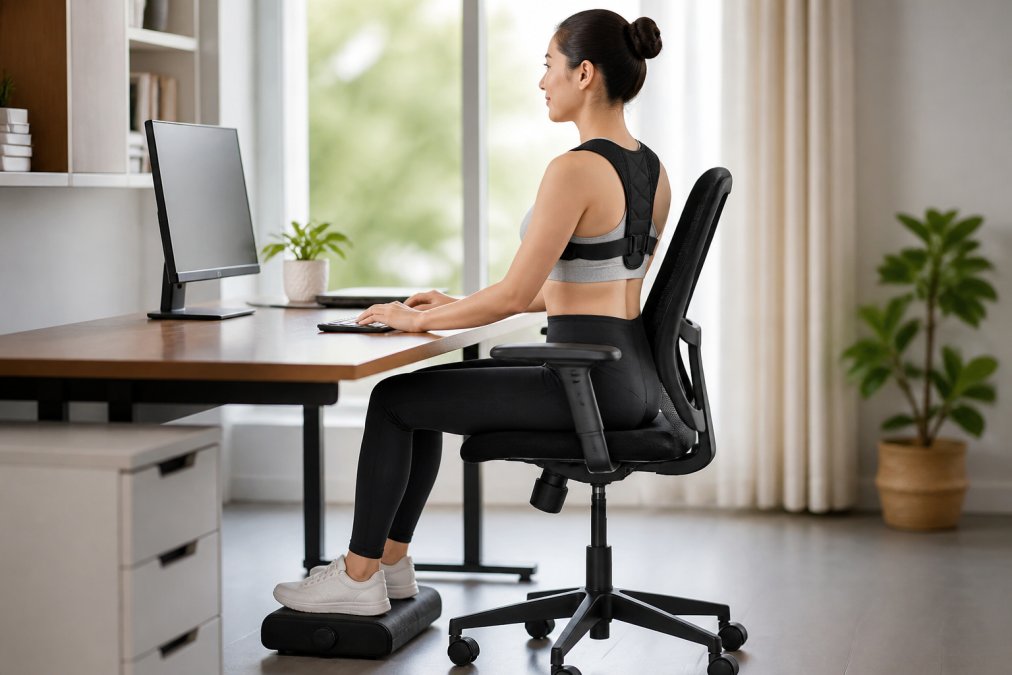
How to Improve Posture While Sitting
Ergonomics create conditions for good posture, but posture itself is an active choice. Improving how you sit requires understanding neutral spine alignment and engaging your core intentionally.
Neutral Spine Alignment Basics
Neutral spine alignment is the position where your vertebral column maintains its natural curves without excessive forward or backward bending. From the side, your spine should show three gentle curves: inward at the neck (cervical), outward at the mid-back (thoracic), and inward at the lower back (lumbar).
Start from the ground up. Feet should be flat on the floor or footrest, hip-width apart. Knees should bend at roughly 90 degrees. Your pelvis should sit in neutral position, not tilted forward or backward. Your ribcage should sit directly over your pelvis, not flaring forward or collapsing inward. Shoulders should sit back and down, not hunched up. Your head should sit directly over your shoulders, not jutting forward. When your head moves forward even two inches, the effective weight on your neck muscles increases dramatically.
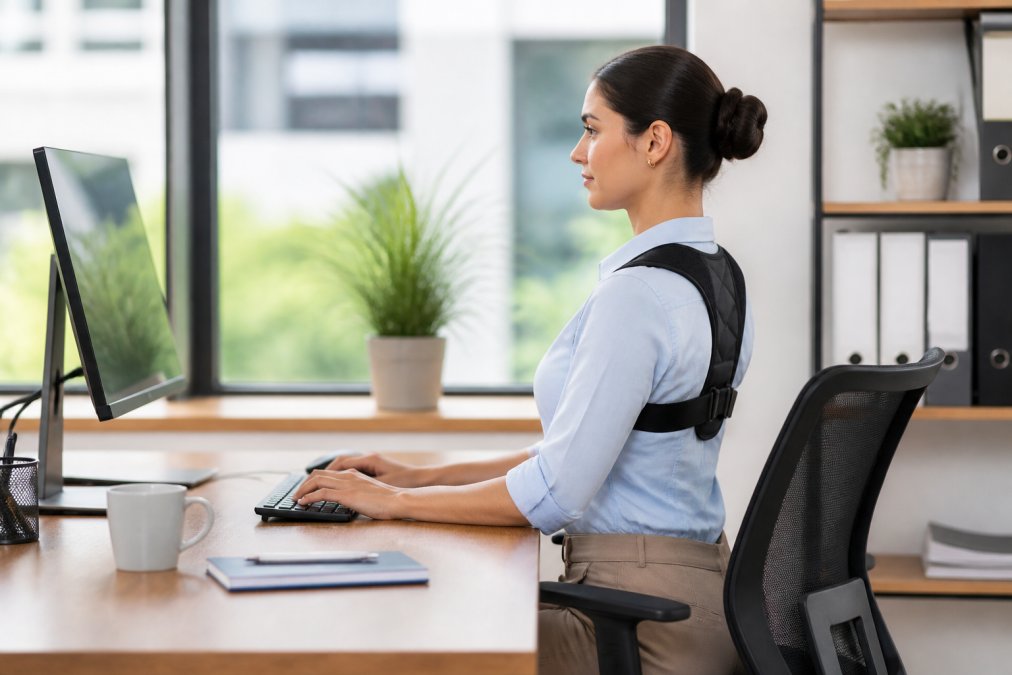
Shoulder Blade Retraction and Core Engagement
Shoulder blade retraction means pulling your shoulder blades down and back slightly. This naturally opens your chest and prevents the rounded-shoulder posture that collapses your thoracic spine. Practice this movement by deliberately squeezing your shoulder blades together and down. You should feel your chest open and upper back muscles activate. You don't maintain maximum contraction all day; instead, practice regularly so your nervous system learns the position and you default to it more often.
Core engagement is equally important for maintaining neutral spine alignment. Your core includes your deep abdominal muscles, back extensors, and pelvic floor working together. Engage your core by gently tightening your abdominal muscles as if bracing for a punch. This should feel like 20-30% of your maximum effort, you should still breathe and move comfortably. The combination of neutral spine alignment, shoulder blade retraction, and gentle core engagement distributes stress across your spine in a way that prevents strain accumulation.
Stretches for Lower Back Pain at Work
Static stretching provides immediate relief from tension accumulated during sitting. Target the specific areas that tighten during desk work: your hip flexors, lower back muscles, and thoracic spine.
Seated Stretches You Can Do at Your Desk
The seated spinal twist is highly effective for office workers. Sit upright with feet flat. Cross your right leg over your left, placing your right foot on the outside of your left knee. Place your left elbow on the outside of your right knee and gently twist your torso to the right, looking over your right shoulder. Hold for 20-30 seconds, then repeat on the other side. This targets your obliques, erector spinae muscles, and thoracic spine.
The seated cat-cow stretch releases tension in your entire spine. Sit upright with feet flat. Place your hands behind your head or crossed over your chest. Slowly round your spine, tucking your chin and pulling your lower belly in (the "cat" position). Hold for a few seconds, then reverse: arch your back gently, lift your chin slightly, and expand your chest (the "cow" position). Move slowly between these positions for 30-60 seconds.
The figure-four stretch targets your hip flexors and glutes. Sit upright and cross your right ankle over your left knee. Lean forward slightly from your hips, keeping your spine neutral. Hold for 20-30 seconds, then switch sides. Tight hip flexors pull on your pelvis and force your lower back into excessive curve.
Standing Stretches for Hip Flexor and Thoracic Release
Stand up every hour and perform at least one standing stretch. The standing hip flexor stretch requires a shallow lunge position. Step your right foot forward, keeping your back heel on the ground. Gently push your hips forward, creating a stretch in the front of your left hip. Hold for 20-30 seconds, then switch sides.
The standing thoracic twist mobilizes your mid-back. Stand with feet hip-width apart. Place your right hand behind your head with your elbow pointing out to the side. Gently rotate your torso to the right. Hold for 15-20 seconds, then repeat on the left.
The standing forward fold releases your entire posterior chain. Stand with feet hip-width apart. Slowly hinge forward from your hips, letting your arms hang toward the floor. Don't bounce. Hold for 30-60 seconds.
Movement Breaks and Micro-Breaks Throughout Your Day
The most damaging aspect of office work isn't any single position, it's sustained absence of movement. Your spine evolved for dynamic activity, not eight-hour static positions.
Implement a micro-break system: every 30 minutes, stand up for 60-90 seconds and do one simple movement, a few cat-cow stretches, a standing forward fold, or walking laps around your office. Longer movement breaks every two hours are equally important. Take a 5-10 minute walk, do gentle yoga, or perform a quick strengthening routine. Movement also resets your nervous system, improves focus, and breaks the stress cycle that amplifies pain perception.
Posture Correctors and Support Tools
Posture correctors work best as training devices rather than permanent solutions. They help your nervous system learn correct positioning so you eventually default to it without external support.
The Posture Corrector from thewellbeingshop.com is designed to support proper spinal alignment through adjustable straps that provide a secure, customized fit. The lightweight and breathable design makes it suitable for daily wear under clothing, making it practical for office use during long sitting hours.
The Black Posture Corrector Belt offers similar alignment support with a focus on comfort and efficacy. It aligns your spine and provides optimum support for your back, ideal for office workers who want consistent external cueing throughout the day.
The Adjustable Back & Shoulder Posture Corrector - Clavicle Support Belt targets your shoulders and clavicle, gently pulling your shoulders back into a natural position. This is especially valuable if your office back pain includes upper back and shoulder components.
The Posture Corrector Back Brace - Adjustable Back Support for Men & Women provides ergonomic support designed to improve posture and reduce slouching. Its adjustable straps offer a secure and comfortable fit, and the lightweight, breathable design makes it suitable for office use.
Use a posture corrector for 2-4 hours daily while actively working on improving your alignment. Wearing one all day can create dependency on external support and prevent your muscles from developing strength to maintain alignment independently.
When to Seek Professional Help
Most office back pain responds to the interventions outlined above within 2-4 weeks. However, certain warning signs indicate you need professional evaluation.
Seek medical attention immediately if you experience radiating pain down your leg, numbness or tingling in your legs or feet, loss of bladder or bowel control, or severe pain that wakes you at night. These symptoms suggest nerve compression or other serious conditions.
Schedule an appointment with a physical therapist or orthopedic specialist if your pain persists beyond four weeks despite consistent effort with ergonomic adjustments, stretching, and movement breaks. If your pain is accompanied by unexplained weight loss, fever, or pain that's worse at night, consult your physician to rule out systemic conditions. Persistent discomfort sometimes warrants mental health support as well, as it affects mood, sleep, and motivation.
Office back pain is one of the most preventable workplace injuries. The combination of ergonomic setup, postural awareness, regular stretching, and movement breaks addresses root causes rather than just masking symptoms. Start with your desk setup this week, add stretching next week, and implement movement breaks the following week. Small, consistent changes accumulate into significant results. At thewellbeingshop.com, we've designed our posture correctors to support this progressive approach, they work best when paired with foundational changes that address why the pain developed in the first place. The goal isn't perfect posture; it's sustainable alignment that lets you work comfortably throughout your day.
| Intervention | Timeframe | Frequency | Expected Impact |
|---|---|---|---|
| Ergonomic desk adjustments | Immediate | One-time setup | Reduces strain within days |
| Posture corrector use | 2-4 weeks | 2-4 hours daily | Trains proper alignment |
| Stretching routine | Daily | 3-5 stretches, 2-3x daily | Releases tension within a week |
| Movement breaks | Ongoing | Every 30-60 minutes | Prevents accumulation of strain |
| Professional evaluation | As needed | Once if pain persists | Identifies underlying issues |
Addressing office back pain requires understanding that your workspace, posture, and movement patterns work together. According to guidelines from the American Chiropractic Association, ergonomic adjustments combined with regular movement are the most effective approach for preventing and resolving work-related back pain. Research from occupational health studies on sedentary work demonstrates that workers who implement regular movement breaks experience significantly reduced musculoskeletal discomfort. Consistency matters more than perfection, small daily habits create the conditions for lasting change. Start this week with one adjustment, add stretching next week, and build your movement routine from there.
Frequently Asked Questions
Q: How can I stop my back from hurting at work?
A: Start with three immediate changes: adjust your chair so your lumbar spine has proper support, position your monitor at eye level, and take a 2-minute movement break every hour. Poor ergonomic setup causes repetitive strain on your vertebral column. Most office back pain improves within 1-2 weeks once your workstation supports neutral spine alignment. If pain persists beyond that, consider a posture corrector or consult a physical therapist.
Q: What are the best ergonomic adjustments to stop back pain at work?
A: The most effective adjustments target desk height, chair positioning, and monitor placement. Your desk should allow your elbows to bend at 90 degrees, your monitor should sit at eye level about 20-26 inches away, and your chair should support the natural curve of your lower back. An adjustable posture corrector belt can reinforce proper spinal alignment while your workstation adjusts. These changes reduce pressure points and musculoskeletal strain significantly.
Q: How often should I take movement breaks to prevent back pain?
A: Stand and move for 2-3 minutes every 60 minutes of sitting. This breaks up sedentary lifestyle patterns that tighten hip flexors and weaken core engagement. Micro-breaks every 30 minutes, even just standing or doing a quick seated spinal twist, help maintain joint mobility and reduce tension relief needs later. Consistent movement is more effective than longer, infrequent breaks.
Q: Are there specific exercises to fix office-related back pain?
A: Yes. Cat-cow stretches, seated spinal twists, and standing hip flexor stretches target the areas office workers strain most. Combine these with core engagement exercises and shoulder blade retraction holds to build postural strength. Start with 5-10 repetitions of each stretch twice daily. If your pain involves chronic discomfort or radiating symptoms, physical therapy exercises tailored to your specific condition will work better than generic office stretches.
This article was written using GrandRanker