


 Link label

Prevent Neck Pain While Working Remotely
Table of Contents
- Why Remote Workers Face Neck Pain
- How to Adjust Monitor Height and Screen Distance
- Building an Ergonomic Home Office Setup
- Best Stretches for Neck Pain Relief
- Micro-Break Routines to Combat Tech Neck
- Posture Correction Tools and Equipment
- Sleep Posture and Pillow Selection
- Frequently Asked Questions
Last Updated: September 24, 2026
Why Remote Workers Face Neck Pain
To prevent neck pain working remotely, you must address sitting in poor posture for hours without breaks.
A low monitor forces forward head posture, straining your cervical spine and creating tension headaches and chronic pain.
Most home offices lack ergonomic design, kitchen tables, stacked books, and poor screen positioning all undermine proper alignment.
Small workspace adjustments prevent neck pain without expensive equipment. Understanding the root cause and fixing it works.
How to Adjust Monitor Height and Screen Distance
Monitor position is the single biggest factor in preventing neck pain while working remotely.
Position the top of your screen at eye level with your spine neutral; your eyes should look slightly downward to keep your cervical spine aligned.
Keep your screen 20-26 inches away; closer distances cause forward lean, farther distances cause eye strain.
Here's how to adjust your setup:
- Raise your monitor using a stand, arm, or stack of books
- Position the screen directly in front of you, not off to one side
- Keep the top of the screen at or just below eye level
- Sit back so your screen sits 20-26 inches away
- Angle the monitor slightly upward, about 15-20 degrees
After adjusting, sit in your normal working position. Look straight ahead. Your gaze should land on the upper third of your screen. If you're looking down, raise the monitor higher. If you're looking up, lower it.
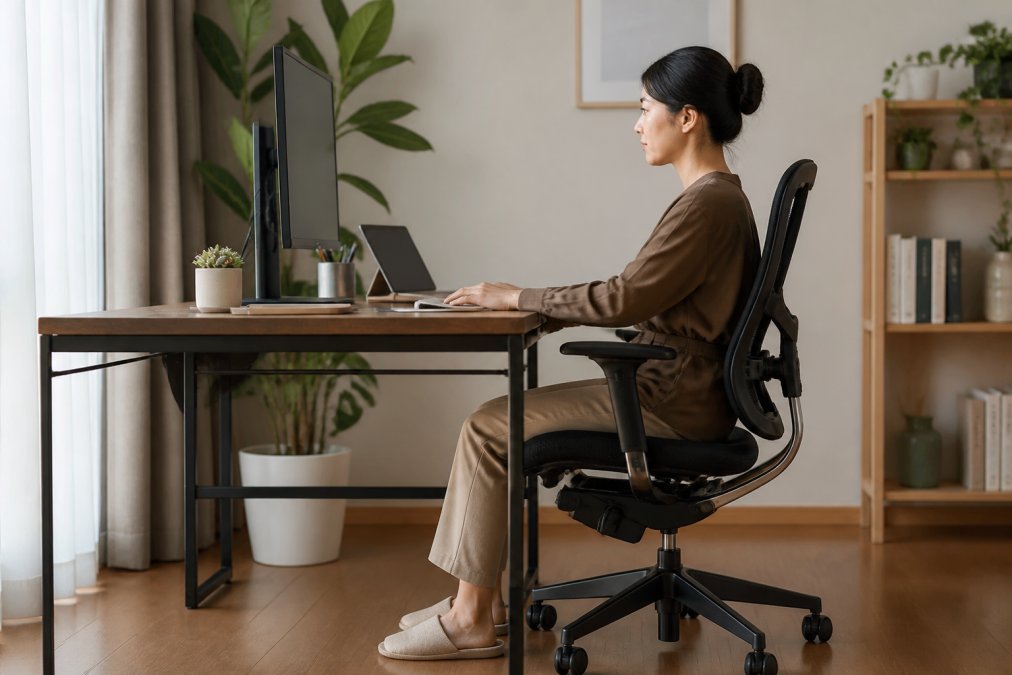
Proper monitor height alone often reduces neck pain within days.
Building an Ergonomic Home Office Setup
An ergonomic setup extends beyond the monitor; every element either supports or undermines good posture.
Chair, desk height, keyboard, and mouse position must align to maintain neutral spine alignment; misalignment forces compensatory bad posture.
Keyboard and Mouse Positioning
Position keyboard and mouse at elbow height to prevent shoulder hunching or awkward reaching.
Place your keyboard centered in front of you with neutral wrists; too high raises shoulders, too low causes hunching.
Position your mouse at keyboard height within easy reach; reaching too far strains your upper back and neck.
Quick fixes for keyboard and mouse placement:
- Use a keyboard tray that sits below your desk surface
- Keep your elbows at 90 degrees when typing
- Position the mouse close to your body, not stretched out
- Alternate which hand you use for the mouse to balance shoulder strain
Chair Selection and Lumbar Support
Your chair is the foundation of good posture; without lumbar support, your lower back rounds and creates neck tension throughout your spine.
Choose a chair with built-in lumbar support or add a lumbar pillow to support your lower back's natural curve, allowing your upper back and neck to align naturally.
Adjust seat height so your feet rest flat on the floor with knees at 90 degrees; dangling feet round your lower back, while high knees tilt your hips.
The American Chiropractic Association's workplace ergonomics guide emphasizes that proper chair support reduces strain on the entire spine, including the neck and cervical region.
Skipping a good chair is the biggest mistake; a quality ergonomic chair costs less than a few months of physical therapy.
Best Stretches for Neck Pain Relief
Stretching releases daily tension and targets your neck, shoulders, and upper back, though it won't fix poor posture alone.
Perform stretches 2-3 times daily for 20-30 seconds each; never bounce or push into pain.
Neck and Shoulder Release Routine
Neck flexion stretch: Sit upright. Slowly drop your chin toward your chest. Feel the stretch along the back of your neck and upper back. Don't force it. Hold for 20-30 seconds.
Lateral neck stretch: Sit upright. Tilt your right ear toward your right shoulder. You'll feel a stretch on the left side of your neck. Hold for 20-30 seconds. Repeat on the other side.
Shoulder rolls: Roll your shoulders backward 10 times slowly. This releases tension in your shoulder blades and upper back.
Chest opener: Clasp your hands behind your back. Straighten your arms and lift your chest. This counteracts the rounded shoulder posture that develops from sitting hunched over a desk.
Upper Back and Cervical Spine Stretches
Thoracic rotation: Sit upright. Cross your right arm across your body. Use your left hand to gently pull your right elbow toward your left side, rotating your upper back. Hold for 20-30 seconds. Repeat on the other side.
Chin tucks: Sit upright. Pull your chin straight back without tilting up or down. You'll feel a gentle stretch at the base of your skull. Hold for 5 seconds. Repeat 10 times. This strengthens the muscles that support proper cervical spine alignment.
Upper trapezius stretch: Sit upright. Tilt your head to the right and gently press down with your right hand. Hold for 20-30 seconds. Repeat on the left side.
Consistent stretching reduces stiffness and improves range of motion; combined with proper ergonomics, it helps prevent neck pain working remotely.
Micro-Break Routines to Combat Tech Neck
Remote workers' biggest mistake is sitting without breaks; even perfect posture becomes painful after 2-3 hours. Micro-breaks every 30-60 minutes interrupt sedentary behavior and prevent muscle fatigue.
Eye strain triggers neck pain: when your screen is poorly positioned, you unconsciously tilt your head forward, straining your cervical spine. Micro-breaks that reset your eyes are as critical as proper monitor positioning.
The 60-Second Micro-Break Protocol
Set a timer for every 45-60 minutes and perform this sequence at your desk:
Minutes 0-20: Eye Reset, Look at something 20 feet away for 20 seconds to relax your ciliary muscles and break forward-head compensation, often providing immediate tension headache relief.
Minutes 20-40: Neck and Shoulder Release, Perform neck flexion (3 reps), lateral neck stretches (2 reps each side), and backward shoulder rolls (5 rotations).
Minutes 40-60: Postural Reset, Stand and walk to another room for 15-20 seconds, or do 10 torso twists at your desk to reset proprioception.
Why 45-60 Minutes?
Muscle fatigue and postural compensation begin after 45 minutes of sitting; by 60 minutes, you unconsciously shift into worse posture. A micro-break at this interval prevents that spiral.
Implementation Strategy
Set a recurring alarm or use a free break-reminder app; label it "Micro-break" so the routine becomes automatic.
Micro-breaks improve focus and energy while reducing tension headaches through eye-strain reduction.
Scaling for Different Work Patterns
For video calls, use a 30-second version (look away 15 seconds, 3 neck rolls, stand 15 seconds). For longer focus blocks, add a second micro-break at 30 minutes with just eye reset and shoulder rolls.
Consistency is key: one micro-break per hour prevents cumulative strain leading to chronic neck pain.
Posture Correction Tools and Equipment
Posture correction tools include wearables and furniture modifications; DIY solutions often work faster for remote workers with non-ergonomic furniture.
DIY Furniture Fixes for Non-Ergonomic Setups
Most remote workers lack dedicated offices and work from kitchen tables, couches, or beds. Fix existing furniture before buying expensive equipment.
When Wearable Posture Correctors Make Sense
Wearable posture correctors (shoulder braces that gently pull your shoulders back) work best after you've fixed your furniture setup. They remind your body what proper alignment feels like and can help retrain muscle memory over 2-4 weeks of consistent use.
They're most effective if you:
- Already have monitor height and chair support correct
- Struggle with rounded shoulders or forward head posture despite ergonomic setup
- Want external reinforcement while your postural muscles strengthen
- Work in an environment where you can wear one discreetly
The Real Hierarchy of Interventions
For preventing neck pain, prioritize in this order:
- Monitor height (free-$15 with books or a basic stand)
- Chair support or lumbar pillow ($15-30)
- Keyboard and mouse height (free-$40)
- Micro-breaks and stretching (free)
- Wearable posture corrector ($15-40, optional)
Most remote workers can eliminate 70-80% of their neck pain by fixing items 1-3. Items 4-5 address the remaining tension and prevent relapse. Expensive ergonomic furniture is nice but not necessary if you optimize what you already have.
Sleep Posture and Pillow Selection
Your sleep posture matters as much as your work posture. Poor sleep positioning creates neck tension that carries over into your workday.
Pillow selection tips:
- Choose a pillow that fills the gap between your shoulder and head
- Side sleepers need a thicker pillow than back sleepers
- Memory foam pillows conform to your neck's shape
- Avoid pillows that are too soft and collapse under your head
- Replace pillows every 1-2 years as they compress over time
Frequently Asked Questions
How often should I take breaks to prevent neck strain while working remotely?
Take a 2-3 minute break every 30-45 minutes of focused work. During each break, stand, walk a few steps, and perform 2-3 gentle neck stretches. This interrupts the sedentary behavior that causes tech neck and muscle fatigue. Set a timer on your phone or computer to build the habit automatically. Consistent micro-breaks are more effective than longer breaks taken infrequently.
What is the best posture to prevent neck pain while sitting at a desk?
Maintain a neutral spine position: shoulders relaxed and back, ears aligned over shoulders, monitor at eye level, and feet flat on the floor. Your cervical spine should feel elongated, not compressed. Avoid forward head posture, which places 10-15 pounds of extra stress on your neck muscles. Use a posture corrector belt to reinforce this alignment while your muscles adapt to proper positioning.
Can a posture corrector actually fix my neck pain, or is it just temporary relief?
A posture corrector provides immediate support and trains your muscles to maintain better alignment over time. Products like the Posture Corrector Belt ($14.99) help reduce slouching and reinforce spinal alignment during work hours. However, the corrector works best alongside stretching, movement breaks, and ergonomic setup adjustments. Think of it as one tool in your toolkit, not a standalone fix.
How can I set up my home office if I don't have a proper desk or ergonomic chair?
Start with monitor height: place your screen on books or a monitor stand so the top is at eye level. Use a pillow or rolled towel behind your lower back for lumbar support. Position your keyboard and mouse at elbow height to keep your shoulders relaxed. If your chair lacks support, add a cushion or back support brace. Combine these low-cost adjustments with posture correction tools and frequent stretching to offset the limitations of basic furniture until you can upgrade.