


 Link label

Stretches to Relieve Tight Hips From Sitting
Table of Contents
- Why Sitting Causes Tight Hips and Lower Back Pain
- Recognizing Hip Tightness: Symptoms and Red Flags
- Static vs. Dynamic Stretching for Hip Flexibility
- Essential Stretches to Relieve Tight Hips From Sitting
- Hip Flexor Stretches for Desk Workers
- Best Equipment for Hip Stretching and Recovery
- Build Your Daily Hip Mobility Routine
- Ergonomic Adjustments and Micro-Breaks to Prevent Hip Tightness
- Frequently Asked Questions
Last Updated: September 27, 2026
Why Sitting Causes Tight Hips and Lower Back Pain
Sitting for hours tightens your hips. When you stay in one position all day, your hip flexors shorten and your gluteal muscles weaken. This imbalance pulls your pelvis forward and strains your lower back.
Consistent stretching reverses most of this damage within weeks.
Recognizing Hip Tightness: Symptoms and Red Flags
Hip tightness shows up as a sharp pinch when crossing your legs, difficulty climbing stairs, and reduced range of motion.
Common symptoms include:
- Pain or stiffness when standing up after sitting
- Difficulty touching your toes
- A clicking or popping sensation in your hip
- Tightness that worsens by afternoon
- Lower back pain that improves when you stretch
Static vs. Dynamic Stretching for Hip Flexibility
Static stretching (holding 20-30 seconds) works best after workouts or at day's end to lengthen muscle fibers. Dynamic stretching prepares your body for movement before exercise or during work breaks, activating muscles without overstretching cold tissue.
Essential Stretches to Relieve Tight Hips From Sitting
These stretches target the specific muscles that tighten during long sitting sessions. Do them daily for best results.
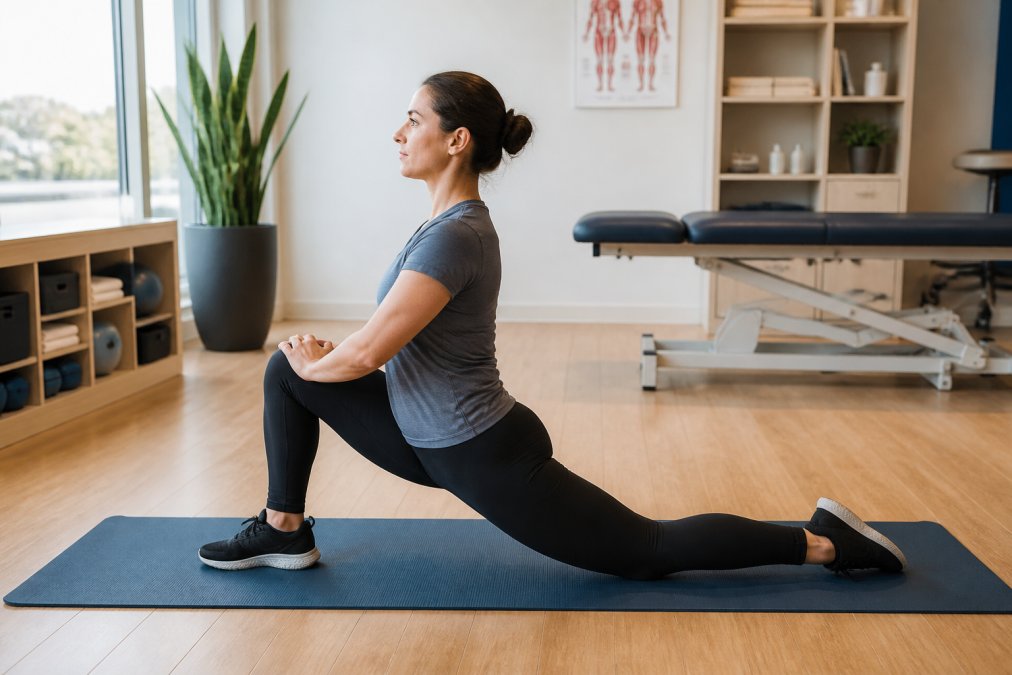
Kneeling Hip Flexor Stretch
This stretch targets your psoas and rectus femoris. Kneel on one knee, step your other foot forward into a lunge, and press your hips forward until you feel a stretch in the front of your hip and thigh. Hold for 30 seconds, 2-3 times per side. Add padding under your back knee if needed.
Pigeon Pose and Variations
Pigeon pose deeply stretches your piriformis muscle. Start on hands and knees, bring your right knee toward your right wrist, and lower your torso toward your front leg for 45-60 seconds. For a gentler option, use the reclined variation: lie on your back, cross one ankle over the opposite knee, and pull your bottom leg toward your chest.
Seated Figure-Four Stretch
Sit in a chair, cross one ankle over the opposite knee, and gently lean forward from your hips. Hold for 30-45 seconds, 2-3 times per side. Do this at your desk during work breaks.
Hip Flexor Stretches for Desk Workers
Desk workers need stretches that fit into a real workday without equipment. Frequency beats duration: three 2-minute micro-sessions spread throughout the day outperform a single 10-minute session because they interrupt the sitting cycle repeatedly.
The 2-Minute Desk Micro-Routine (No Equipment)
Perform this routine every 2 hours during your workday. Total time: 2 minutes. No mat, no special clothing required.
Standing Hip Flexor Stretch (60 seconds total)
- Stand facing your desk, about 12 inches away
- Step your right foot back into a shallow lunge
- Keep your back heel on the ground
- Press your hips forward until you feel a stretch in the front of your right hip and thigh
- Hold for 30 seconds
- Repeat on your left side for 30 seconds
Seated Figure-Four at Your Desk (60 seconds total)
- Sit upright in your chair with both feet flat on the floor
- Cross your right ankle over your left knee
- Gently lean forward from your hips until you feel a stretch in your right outer hip and glute
- Hold for 30 seconds
- Repeat on the left side for 30 seconds
Couch Stretching for Aggressive Hip Flexor Release
Couch stretching uses gravity and leverage to lengthen the hip flexor more deeply. Kneel on a couch facing the back, place your right foot flat on the seat, let your left leg hang off the edge, and gently lean your torso back. Hold for 60 seconds per side. As flexibility improves, increase depth by pressing your hips down.
Quad and Hip Flexor Combo (Standing)
This stretch targets both muscles simultaneously and works well as a transition stretch between desk work and movement.
- Stand on your left leg
- Bend your right knee and pull your right foot toward your glute
- Keep your knees parallel (do not let your right knee drift outward)
- Maintain an upright posture; do not arch your back
- Hold for 30 seconds
- Switch sides and repeat
Frequency and Timing
Perform the 2-minute desk micro-routine at these times:
- 10:00 AM (after 2 hours of morning sitting)
- 1:00 PM (after lunch)
- 4:00 PM (afternoon slump)
Most desk workers notice measurable improvement in hip mobility and lower back comfort within 5-7 days. Frequent stretching plus reduced sitting time is more effective than stretching alone.
Best Equipment for Hip Stretching and Recovery
The right tools accelerate your progress. Foam rolling, massage balls, and yoga props help release tight muscles faster than stretching alone.
Build Your Daily Hip Mobility Routine
Consistency beats intensity. A 10-minute daily routine produces better results than a 60-minute session once per week.
Morning routine (5 minutes):
Leg Massage Machine Annular Foam Roller →
- 2 minutes of dynamic leg swings and hip circles
- 90-second kneeling hip flexor stretch (both sides)
- 90-second pigeon pose (both sides)
Midday break (3 minutes):
- Standing hip flexor stretch (1 minute)
- Seated figure-four stretch (2 minutes)
Evening routine (5 minutes):
- Peanut ball release on hips (2 minutes)
- Reclined pigeon pose (90 seconds per side)
- Child's pose with hip opening (1 minute)
| Time | Exercise | Duration | Frequency |
|---|---|---|---|
| Morning | Dynamic leg swings | 2 min | Daily |
| Morning | Kneeling hip flexor stretch | 90 sec | Daily |
| Midday | Standing hip flexor stretch | 1 min | Daily |
| Evening | Peanut ball release | 2 min | 4x weekly |
| Evening | Reclined pigeon pose | 90 sec | Daily |
Ergonomic Adjustments and Micro-Breaks to Prevent Hip Tightness
Stretching reverses hip tightness, but ergonomic adjustments prevent it from returning. A poorly configured workstation forces hip flexors into a shortened position for 8+ hours daily. Keep your hips at or near 90 degrees and interrupt sitting every 30 minutes.
Proper Desk Setup: Measurements That Matter
Monitor height and distance:
- Top of your monitor should be at or slightly below eye level
- Distance from your eyes to screen: 20-26 inches (about arm's length)
- Too low: you'll lean forward and shorten hip flexors
- Too high: you'll extend your neck backward and increase hip flexor tension
Chair height and hip angle:
- Adjust your chair so your elbows bend at 90 degrees when your hands rest on your keyboard
- Your hips and knees should both be at 90-degree angles when seated
- Your feet should rest flat on the floor or on a footrest
- Too high: hips higher than knees, shortening hip flexors
- Too low: knees rise above hips, straining your lower back
Keyboard and mouse position:
- Keyboard should be directly in front of you, not angled
- Mouse should be at the same height as your keyboard, close to your body
Sitting Posture: The Pelvic Tilt Problem
Most desk workers sit with anterior pelvic tilt, hips tilted forward, which is the primary cause of hip flexor shortening during sitting.
How to identify anterior pelvic tilt:
- Your lower back has an exaggerated curve
- You feel lower back pain by mid-afternoon
- Your hip flexors feel tight even after stretching
How to correct it:
- Sit upright in your chair
- Gently tuck your pelvis under you (imagine pulling your tailbone slightly toward your pubic bone)
- Engage your core slightly, not rigidly, but enough to feel your abdominal muscles activate
- Your lower back should have a gentle curve, not a pronounced one
- This position keeps your hip angle closer to 90 degrees and prevents shortening
Standing Desk and Sit-Stand Transitions
A standing desk or desk converter breaks up sitting time, the single most effective prevention strategy.
Sit-stand protocol:
- Sit for 30-45 minutes
- Stand for 15-20 minutes
- Repeat throughout the day
Standing posture matters:
- Keep your weight evenly distributed on both feet
- Avoid locking your knees
- Engage your core gently
- Keep your shoulders relaxed
Micro-Break Timing and Execution
Micro-breaks interrupt the sitting cycle and prevent hip flexor adaptation to shortened positions.
Every 30 minutes, perform a 60-second micro-break:
- Stand up from your desk
- Do 5-10 slow hip circles in each direction (30 seconds)
- Perform one standing hip flexor stretch on each side (20 seconds)
- Walk to get water or move to another room (10 seconds)
The Synergy: Ergonomics + Stretching + Movement
Ergonomic adjustments alone reduce hip tightness by about 40%; stretching alone by about 50%. Combined with micro-breaks, the three strategies reduce hip tightness by 85-90% because they address the problem from three angles: ergonomics prevents excessive shortening, stretching lengthens muscles, and micro-breaks interrupt the sitting stimulus.
Frequently Asked Questions
What causes extremely tight hips from prolonged sitting?
Sitting for extended periods shortens the hip flexors and psoas muscle, restricting your range of motion. Your gluteal muscles become underactive, creating muscular imbalance. This anterior pelvic tilt compresses hip joints and strains your lumbar spine. Remote workers and desk professionals are especially vulnerable because sedentary lifestyle patterns accumulate over hours without natural movement breaks. Tight hips often develop within weeks of increased sitting, though the pain may not surface immediately.
How often should I stretch my hips during the workday?
Aim for micro-breaks every 60-90 minutes. A 2-3 minute stretch session breaks up sedentary stress and prevents cumulative tension. Include dynamic hip movements (leg circles, walking lunges) in the morning, static stretches at midday, and deeper stretching after work. Consistency matters more than duration. Daily hip mobility work prevents stiffness far better than occasional intense sessions. Even 20 seconds of pigeon pose or a kneeling hip flexor stretch every 90 minutes significantly improves flexibility and reduces chronic pain.
Can tight hips cause lower back pain?
Yes. Tight hip flexors and weak gluteal activation force your lumbar spine to compensate, causing anterior pelvic tilt. This misalignment strains lower back discs and supporting muscles. Reduced hip mobility also limits your ability to hinge at the hips during daily movements, forcing your spine to bend instead. Addressing hip tightness through stretching, core stability work, and ergonomic adjustments often resolves lower back discomfort that stretching the back alone cannot fix.
How long does it take to unlock tight hip flexors?
Most people notice improved range of motion within 2-3 weeks of consistent daily stretching. Significant flexibility gains typically appear after 6-8 weeks. However, chronic tightness from months of sitting may require 12+ weeks of dedicated work. The timeline depends on how tight your hips are, how consistently you stretch, and whether you address ergonomics and movement habits. Static stretching provides immediate relief but lasting change requires regular practice combined with dynamic movement and equipment-assisted recovery like foam rolling.
Tight hips from sitting don't fix themselves. They get worse without intervention. Start with just 10 minutes of daily stretching and proper desk ergonomics. Add recovery tools from thewellbeingshop.com like the Yoga Peanut Ball Set or Leg Massage Machine to accelerate your results. Within three weeks, you'll move better, feel less pain, and have the mobility you lost to your desk job.