


 Link label

5 Ways to Choose an Ergonomic Office Chair for Back Pain
Last Updated: October 24, 2026
Quick Summary
An ergonomic office chair back pain solution combines adjustable lumbar support that moves vertically and in depth, a seat depth of two to three fingers from your knees, and a backrest extending to at least your mid-back. Lumbar support maintains your spine's natural curve, reducing pressure on intervertebral discs and preventing the muscle fatigue that causes chronic tension during eight-plus hours of weekly sitting.
- Adjustable lumbar support should move both vertically and in depth to customize support to your unique lumbar curve.
- Seat depth should leave two to three fingers of space between the seat edge and back of your knees when sitting upright.
- High-density foam above 2.0 pounds per cubic foot maintains cushion shape and support over months of daily use.
- Test chairs for at least 15 minutes and in your actual work environment before committing to purchase.
- Stand and walk for two to three minutes every hour to reset your spine and prevent muscle fatigue from prolonged sitting.
Table of Contents
- Why Lumbar Support Matters in an Ergonomic Office Chair for Back Pain
- Best Office Chair for Lower Back Pain: What the Research Shows
- Ergonomic Office Chairs with Lumbar Support: Key Features to Evaluate
- Best Office Chair for Long Hours: Comfort and Durability Trade-Offs
- How to Sit in an Office Chair with Back Pain: Posture and Movement Setup
- Common Mistakes When Choosing a Chair for Back Pain
- Finding Your Fit: Measuring and Testing Before You Commit
- Frequently Asked Questions
Why Lumbar Support Matters in an Ergonomic Office Chair for Back Pain
An ergonomic office chair back pain solution isn't just about comfort, it's about preventing your spine from deteriorating during the eight-plus hours you sit each week.
The lumbar region bears most of your body weight while seated. Without adjustable lumbar support, your lower back muscles work overtime to compensate, causing fatigue and chronic tension. The right chair isn't a luxury, it's foundational to working pain-free.
Lumbar support maintains the inward curve of your lower spine, called the lumbar lordosis, reducing pressure on your intervertebral discs and distributing weight evenly across your vertebrae.
The best ergonomic office chairs for back pain feature adjustable lumbar support that moves with you as you shift positions. Static lumbar support helps initially but fails when your posture changes.
Best Office Chair for Lower Back Pain: What the Research Shows
Lower back pain accounts for more missed workdays than almost any other condition among office workers. Your chair must support your spine's natural curve while allowing movement and adjustment as your body fatigues.
Research consistently shows chairs designed to support the lumbar spine reduce discomfort more effectively than general-purpose seating.
When evaluating a chair for lower back pain, look for adjustable lumbar support that moves vertically, a backrest that extends at least to your mid-back, and a seat depth that lets your feet rest flat on the floor without pressure behind your knees.
Many people choose chairs based on the first five minutes of sitting. That's a mistake. The real test is how your back feels after four hours. A chair that feels soft initially often lacks the structural support your spine needs, while a firm chair provides superior support as your body settles into it.
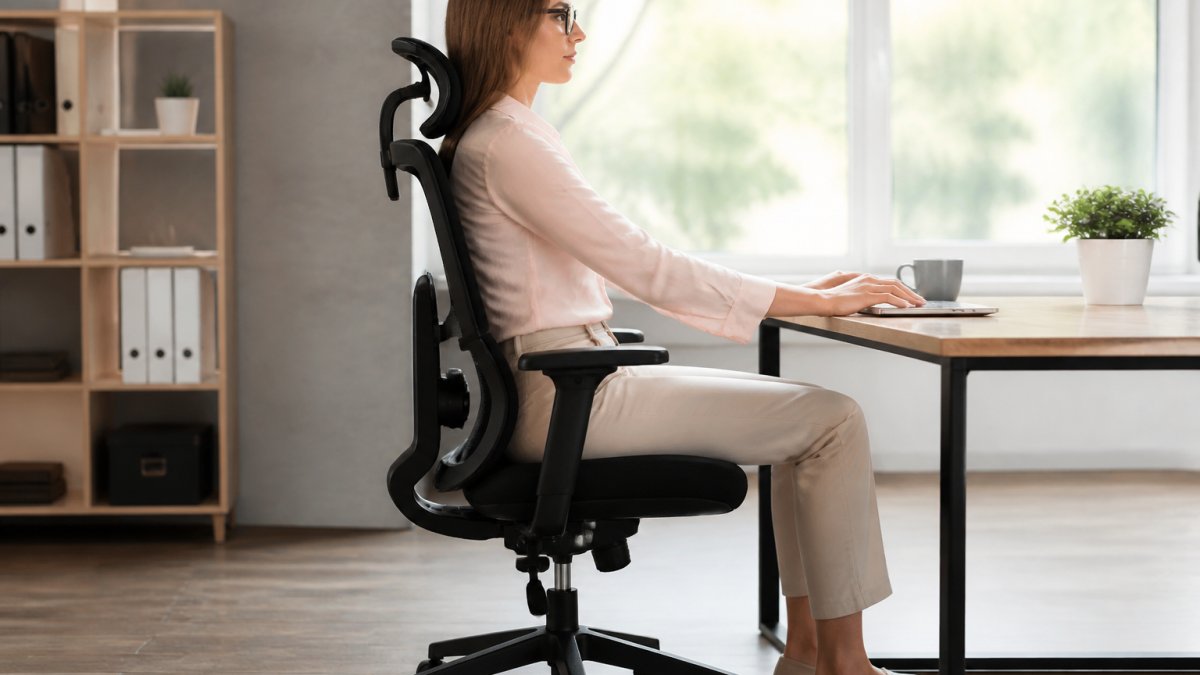
Ergonomic Office Chairs with Lumbar Support: Key Features to Evaluate
Choosing the right ergonomic office chair with lumbar support requires knowing which features actually matter and which are marketing noise.
Adjustable Lumbar Support and Spinal Alignment
The lumbar support mechanism separates chairs into two categories: those that work and those that don't. Adjustable lumbar support should move vertically and, ideally, allow depth adjustment so you can customize how far the support protrudes into your lower back.
Depth adjustment is critical because your lumbar curve is unique: a depth that works for a 5'6" person may be too aggressive for someone 6'2". Vertical adjustment aligns the support with your actual lumbar spine, not a theoretical average.
Lumbar support that only adjusts vertically without depth control often misses the mark. You'll sit forward to escape support that's too aggressive, defeating the purpose entirely.
Test lumbar support at multiple positions: sit upright, lean back slightly, then return to neutral. The support should feel consistent across all positions. If you must readjust every time you move, the mechanism is inadequate.
Seat Depth, Height, and Weight Distribution
Seat depth determines how much of your thigh receives support. A seat that's too deep pushes your knees forward and cuts off circulation; too shallow leaves your thighs unsupported and shifts weight onto your lower back.
The ideal seat depth leaves two to three fingers of space between the seat's front edge and the back of your knees when sitting upright with your back against the backrest. This prevents pressure points while maintaining full thigh support.
Seat height adjustability is non-negotiable. Your feet must rest flat on the floor (or a footrest) with knees at a 90-degree angle; otherwise your spine compensates by curving unnaturally.
Weight distribution across the seat cushion affects how pressure loads onto your spine. A dense, high-quality cushion distributes weight evenly; a soft or worn cushion creates pressure points that concentrate stress on your lower back and tailbone.
Armrests, Headrest, and Backrest Design
Armrests serve a critical but overlooked function: they reduce the load your shoulders and neck place on your spine. When your arms dangle unsupported, your upper back tenses to stabilize your shoulders, creating tension that radiates to your lower back.
Adjustable armrests let you position them so your elbows rest at roughly 90 degrees while your hands rest on your keyboard. Fixed armrests that are too high or too low make you shrug or lean forward, straining your entire spine.
A headrest isn't essential for lower back pain relief, but it prevents your neck from compressing your upper spine, which can indirectly affect lower back alignment.
The backrest should extend to at least your mid-back and ideally to your shoulders.
Best lumbar support pillows can complement built-in chair support(page:2)
These key features separate chairs that effectively support your back from those that merely claim to.
| Feature | What to Look For | Why It Matters |
|---|---|---|
| Lumbar Support | Adjusts vertically and in depth | Customizes support to your unique lumbar curve |
| Seat Depth | Two to three fingers space from knees | Prevents circulation cutoff and maintains thigh support |
| Seat Height | Adjusts 17 to 21 inches | Keeps feet flat and knees at 90-degree angle |
| Seat Cushion | High-density foam above 2.0 lbs/cubic foot | Maintains shape and support over months of use |
| Armrests | Adjustable to 90-degree elbow angle | Reduces shoulder and neck tension on spine |
| Backrest | Extends to mid-back or shoulders | Supports thoracic spine and prevents forward rounding |
Best Office Chair for Long Hours: Comfort and Durability Trade-Offs
Sitting for eight consecutive hours demands a different chair than sitting for four. Long-hour seating requires materials and design features that maintain their integrity over time while preventing fatigue-related pain.
Mesh backs offer superior breathability to padded backs, which matters during extended sitting. A mesh back allows air circulation, preventing the sweaty-back discomfort of padded materials.
Foam density in the seat cushion directly impacts how long you can sit comfortably. High-density foam (above 2.0 pounds per cubic foot) maintains its shape for years; low-density foam compresses quickly, losing support within months.
Warranty length correlates with durability, though it's not a perfect indicator.
Recline functionality matters during long sitting sessions because it lets you change pressure points. A chair that reclines smoothly without constant adjustment prevents fatigue from locked-in positioning.
How to Sit in an Office Chair with Back Pain: Posture and Movement Setup
Choosing the right chair solves only half the problem. How you sit in it determines whether it relieves your pain or becomes another expensive purchase that disappoints you.
Positioning Your Chair and Workstation
Your feet must rest flat on the floor or footrest at all times. If your feet dangle, your thighs bear all your upper body weight, cutting off circulation and shifting stress to your lower back.
Your monitor should be at eye level when you're sitting upright. If you look down at your screen, you're rounding your thoracic spine, which pulls your entire spine forward and increases lumbar compression.
Your keyboard and mouse should be positioned so your elbows rest at roughly 90 degrees and your wrists remain neutral.
Lean back into your chair so your entire back contacts the backrest. Many people sit forward, using only the front portion of the seat. This removes you from lumbar support and forces your lower back muscles to work constantly.
Movement Breaks and Spinal Health
Sitting still for more than 60 minutes, even in the best ergonomic office chair back pain solution, creates stiffness and fatigue. Your spine needs movement to stay healthy. The best chair in the world cannot replace regular movement breaks.
Stand and walk for two to three minutes every hour. This simple action resets your spine's position, allows your discs to rehydrate, and prevents the muscle fatigue that builds during prolonged sitting. Many people ignore this because they're focused on their work, but the cost of skipping movement breaks shows up in afternoon pain and evening stiffness.
Gentle stretching during breaks accelerates recovery. Learn complementary strategies to address office back pain holistically. Forward folds, spinal twists, and hip flexor stretches counteract the compression and tightness that sitting creates. You don't need a full stretching routine, even 30 seconds of intentional stretching every two hours makes a measurable difference.
Discover yoga poses specifically designed for spinal health and back pain recovery(page:4)
Common Mistakes When Choosing a Chair for Back Pain
Most people approach chair selection backward. They test a chair for five minutes, it feels good, and they buy it. Then reality hits around hour three of sitting, when the chair's inadequacies become obvious.
The first mistake is prioritizing initial comfort over structural support. A soft, padded chair feels luxurious for the first 30 minutes.
The second mistake is ignoring seat depth. Many people buy chairs that are too deep, thinking more seat means more comfort.
The third mistake is choosing a chair based on price alone. Budget chairs often feature fixed lumbar support that doesn't adjust. You're then forced to accept whatever support angle the manufacturer decided was average.
The fourth mistake is not testing the chair in your actual work environment.
Finding Your Fit: Measuring and Testing Before You Commit
Your body's dimensions determine which chairs will work and which won't.
Measure your torso length from the base of your spine to your shoulders. This determines the minimum backrest height you need. A backrest that's too short leaves your mid-back unsupported.
When you test a chair, sit in it for at least 15 minutes before deciding. Five minutes isn't enough time to feel how the lumbar support actually contacts your spine.
Pay attention to pressure points. If you feel pressure on your tailbone, the seat cushion is too firm or the seat depth is wrong.
Ask about return policies before purchasing. A 30-day return window allows you to test the chair in your actual work environment.
Back pain from office work is preventable, but only if your chair supports your spine rather than fighting against it.
Frequently Asked Questions
What features should I look for in an ergonomic office chair for back pain?
Prioritize adjustable lumbar support that matches the natural curve of your spine, seat depth and height adjustability to fit your body dimensions, and a backrest that supports both lower-back and upper-back regions. Armrests should reduce shoulder strain, and breathable materials prevent heat buildup during long hours. Test how the chair distributes your weight and whether the tilt mechanism allows movement without compromising support.
Is adjustable lumbar support important in an ergonomic office chair?
Yes. Adjustable lumbar support lets you customize the chair to your spine's natural curve, which varies by body type and posture pattern. Fixed lumbar support may not align with your lower-back contours, leaving pressure points and discomfort. Adjustability also lets you modify support as your back pain patterns change throughout the day or week, making it a critical feature for long-term comfort and spinal alignment.
How do I know if an office chair will actually help my back pain?
Measure your seat height, depth, and backrest angle against the chair's specifications before purchasing. If pain persists, the issue may be workstation setup or movement habits, not the chair alone.
What is the difference between lumbar support and upper-back support?
Lumbar support targets your lower back and sacrum, where many chronic pain patterns originate. Upper-back support stabilizes your mid-back and shoulders, preventing forward slouch and neck strain. The best ergonomic office chairs provide both: adjustable lumbar support for the lower-back curve and a contoured backrest that extends to shoulder height. Together, they maintain proper spinal alignment across your entire back during all-day sitting.
